 BeeTwo
Your Backblaze B2 buckets,
finally at home on your Mac.
Browse, search, upload and share your files without the web console. BeeTwo handles huge folders, finds any file across all your buckets in an instant, and manages buckets and keys for you.
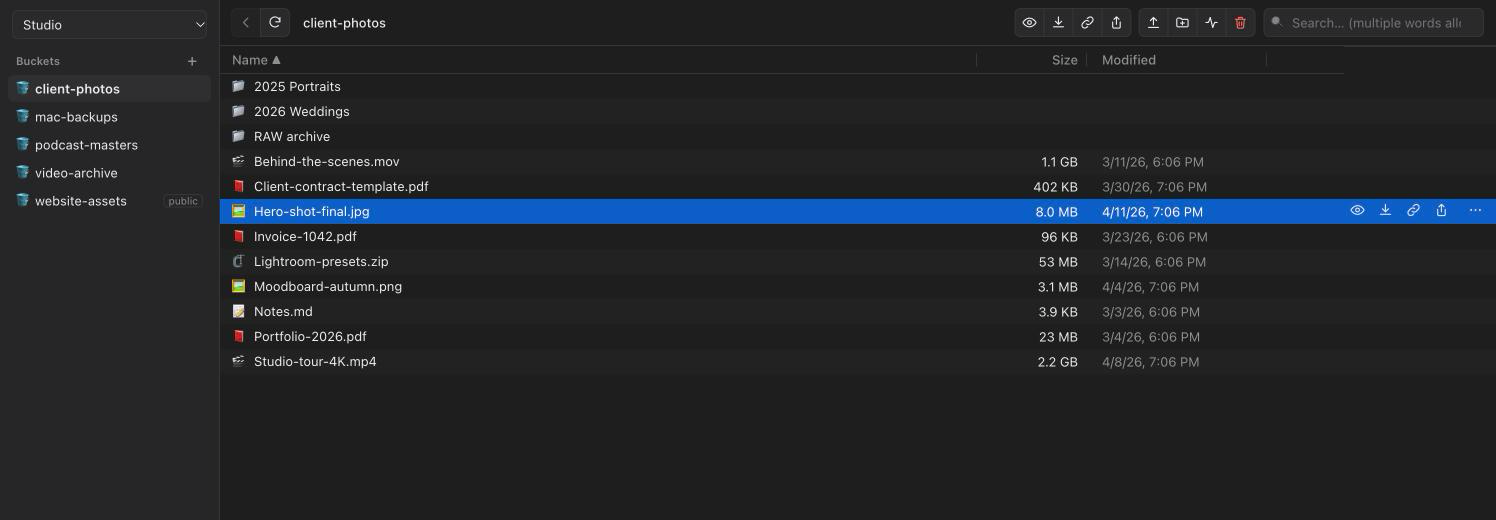
Everything the web console makes painful
Built for people who keep real data in B2: photos, videos, backups, websites.
Search every bucket at once
Type a few words, in any order, and find a file among millions — across all your buckets, instantly. Filter by type, sort by location.
Huge folders, no drama
Drag a folder with 30,000 files. Parallel transfers, automatic retries, and a real resume: files already online are skipped.
Buckets and keys, in two clicks
Create buckets, make them public or private, create and revoke application keys — without logging in to the web console.
Quick Look for the cloud
Press Space to preview photos, play videos and audio straight from B2, read PDFs and text — nothing is downloaded first.
Share like a Mac app
Signed links that expire, or the native Share menu: AirDrop, Messages, Mail. Rename, move and delete with Finder shortcuts.
Private by design
Your keys stay in the macOS Keychain, behind Touch ID if you like. BeeTwo talks only to Backblaze — no account, no tracking.
BeeTwo vs. the alternatives
What other B2 tools don’t do.
| BeeTwo | Cyberduck | FileZilla Pro | B2 web console | |
|---|---|---|---|---|
| Create and revoke application keys | ✓ | — | — | ✓ |
| Search every bucket at once | ✓ | partial¹ | partial¹ | — |
| Files larger than 500 MB | ✓ | ✓ | ✓ | — |
| Skip files already online | ✓ | ✓ | ✓ | — |
| Preview with the Space bar | ✓ | ✓ | — | — |
| Price | Free (beta) | Free (donations) | Paid | Included |
¹ Searches the open folder and its subfolders by listing the server each time: slow on large buckets, one bucket at a time. BeeTwo keeps a local index and searches all your buckets instantly. Based on public documentation, October 2026.
Installing the beta
- Open BeeTwo.dmg and drag BeeTwo into your Applications folder.
- The beta isn't notarized by Apple yet, so the first time macOS blocks it. Open System Settings › Privacy & Security and click Open Anyway next to BeeTwo.
- Sign in with a Backblaze B2 application key (keyID + applicationKey). That's it — updates then install themselves.
Available in English, French, Spanish, German and Italian.